This page explains how to use Google Calendar, Microsoft 365 / Outlook, and iCloud with the public FreeSlot service (https://en.freeslot-schedule.com).
Who this page is for
Users who want to use Google Calendar, Microsoft 365 / Outlook, or iCloud with FreeSlot
Operators, organization administrators, or IT reviewers who want to check the OAuth and calendar integration settings
How calendar information is used
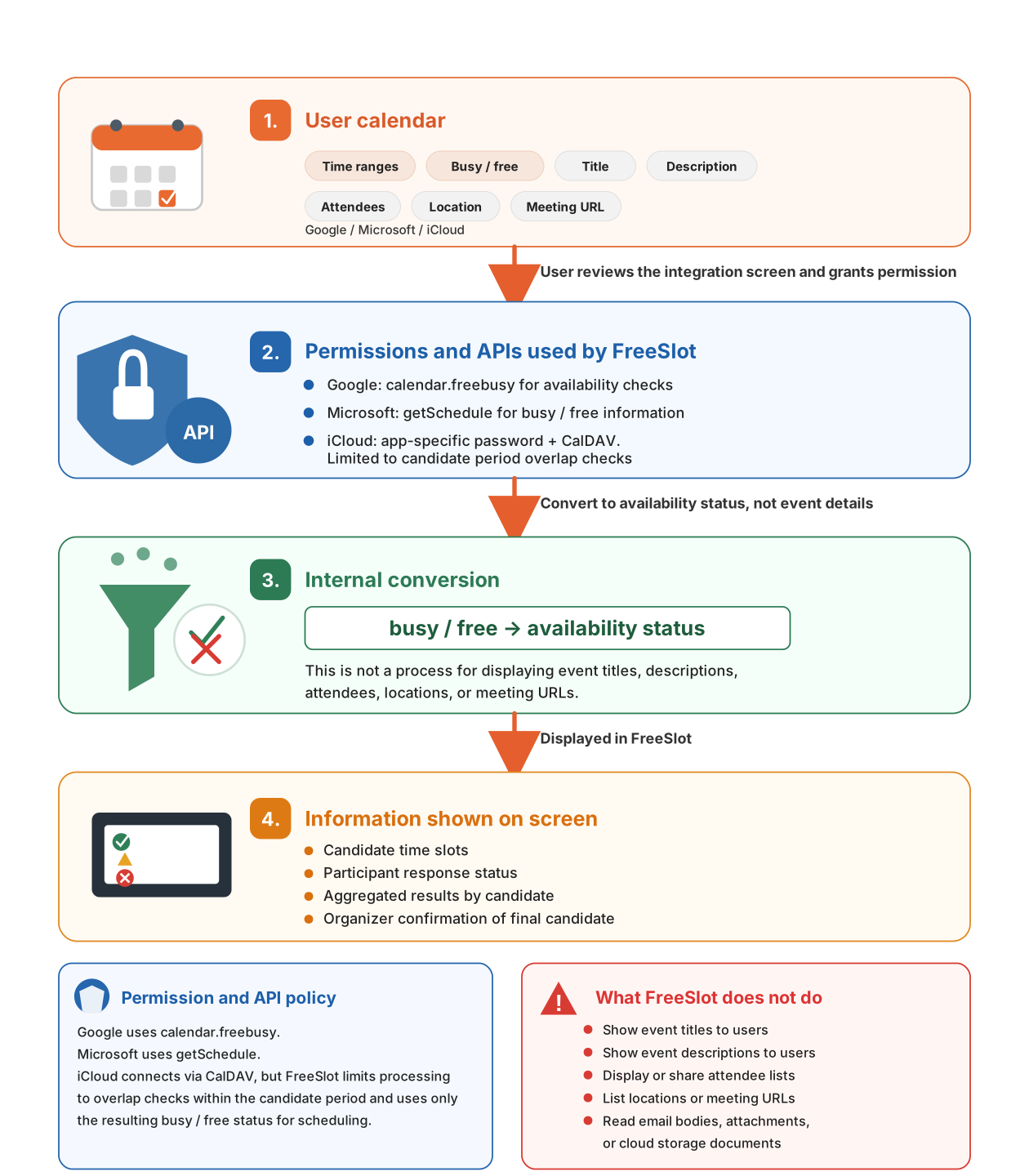
FreeSlot is designed to limit calendar information at each stage: (1) the required permission scope, (2) the types of information used, (3) conversion into internal availability judgments, and (4) the information shown on user-facing screens. FreeSlot uses calendar integration to make availability judgments needed for scheduling, and does not aim to display, share, or list event titles, descriptions, attendees, locations, or other event details to users.
What FreeSlot sees and does not show
FreeSlot is not a service that displays the contents of a calendar as-is.
When calendar integration is used, FreeSlot checks whether there are events during candidate time slots
and converts that information into availability judgments needed for scheduling.
FreeSlot does not aim to display, share, or list event titles, descriptions, attendees, locations, meeting URLs,
or other event details to users.
FreeSlot converts calendar information into busy / free or availability status for candidate time slots.
1. Google Calendar
1-1. How users connect Google Calendar
Click the Google integration button in FreeSlot.
When the Google sign-in screen appears, choose the Google account you want to use.
Review the permission screen and approve the connection.
After authentication, you will return to FreeSlot.
Review the imported result and manually adjust it if necessary.
1-2. Google Cloud settings registered for the public FreeSlot service
For the public FreeSlot service, FreeSlot manages the Google Cloud OAuth client used for Google Calendar integration. Regular users do not need to create their own Google Cloud Console project or OAuth client.
The public FreeSlot service uses the minimum calendar availability permission needed to check whether candidate time slots overlap with existing calendar events. FreeSlot does not display, share, or list event titles, descriptions, attendees, locations, or other event details to users.
The redirect URIs registered for the English version are as follows.
Note
Depending on the type of Google account or the organization’s administration policy, integration with external apps may be restricted. If the screen does not return to FreeSlot after authentication, check that the callback URL used by FreeSlot matches the redirect URI registered in Google Cloud.
1-3. Permissions and API used by FreeSlot [Google integration]
Permission used: calendar.freebusy
Google integration uses calendar.freebusy to check calendar availability.
This permission is for checking free / busy information during the candidate period,
and is not a permission for retrieving event titles, descriptions, attendees, locations, or other event details.
FreeSlot converts the obtained free / busy information into availability judgments for candidate time slots,
and does not display, share, or list event details to users.
Click the Microsoft 365 integration button in FreeSlot.
Sign in with the work or school account you want to use on the Microsoft sign-in screen.
Review the permission screen and continue.
After authentication, you will return to the original FreeSlot screen.
Review the result and manually adjust it if necessary.
Microsoft 365 integration is intended for Microsoft 365 work or school accounts. Personal Microsoft accounts, such as outlook.com or hotmail.com accounts, are currently outside the scope of FreeSlot integration.
2-2. When administrator consent is required by your organization
Depending on the Microsoft 365 / Entra ID settings of your organization, you may not be able to approve FreeSlot integration by yourself, and a message such as “Need admin approval” may appear.
In that case, this is not a FreeSlot malfunction. It means that your organization’s Microsoft 365 administration policy restricts app integration. Please ask your Microsoft 365 / Entra ID administrator to approve the FreeSlot app. In particular, organizations may restrict user consent for external multi-tenant apps or apps from unverified publishers.
When asking your administrator for approval, include the “FreeSlot Microsoft 365 integration app information” shown in the next section.
2-3. Microsoft Entra settings registered for the public FreeSlot service
For the public FreeSlot service, FreeSlot manages the Microsoft Entra app registration used for Microsoft 365 integration. Regular users do not need to create their own Entra app registration.
To support Microsoft 365 work or school accounts across organizations, the FreeSlot app is configured as a multi-tenant Entra ID application. This allows users who belong to Microsoft Entra ID tenants in different organizations to use the integration, subject to their organization’s policies.
If you need to ask your organization administrator for approval, provide the following app information.
FreeSlot Microsoft 365 integration app information
App name: FreeSlot
Application (client) ID: 3d7aab55-c82d-4533-8db0-6e63e8e8a021
Public site: https://freeslot-schedule.com/
English version: https://en.freeslot-schedule.com/
Privacy policy: https://en.freeslot-schedule.com/privacy.html
Terms of service: https://en.freeslot-schedule.com/terms.html
Contact: support@freeslot-schedule.com
The redirect URIs registered for the English version are as follows.
Note
Organization accounts may be subject to app integration restrictions under the organization’s policies. The redirect URIs configured in Entra must match the URLs actually used by FreeSlot.
2-4. Permissions and API used by FreeSlot [Microsoft integration]
API used: getSchedule
Microsoft integration uses the Microsoft Graph availability API
(getSchedule).
This API is for retrieving free / busy information for a specified period,
and is not an API for retrieving event titles, descriptions, attendees, locations, or other event details.
FreeSlot converts the obtained availability information into availability judgments for candidate time slots,
and does not display, share, or list event details to users.
Enter the generated password into the iCloud connection screen in FreeSlot.
Note
A normal Apple Account password may not work. If the connection fails, check whether an app-specific password is required.
3-3. Common issues
A normal Apple Account password may not work.
Two-factor authentication and Apple account settings may require preparation in advance.
A typo in the connection information may cause the connection check to fail.
3-4. Permissions and API used by FreeSlot [iCloud integration]
Connection method: App-specific password + CalDAV
iCloud integration connects to CalDAV using an Apple app-specific password.
CalDAV is a standard protocol for accessing calendar information, and therefore differs in nature
from the availability-specific APIs used by Google and Microsoft.
For this reason, FreeSlot limits the target information to events within the candidate period
and mechanically checks only whether event time ranges overlap with candidate time slots.
After that judgment, only the busy / free status for each candidate slot is used for scheduling.
Event titles, descriptions, attendees, locations, meeting URLs, and other details are not treated as retrieval targets
in FreeSlot's scheduling process, and are not displayed, shared, or listed to users.